AI, Safer Browsing, and Fake Mac Ads
This week’s Apple security and privacy news is less about one big emergency and more about a few changes that are worth understanding before they become part of everyday life. Apple used WWDC to preview new AI features, a new Siri experience, and stronger family safety controls. Security researchers also continued to warn about fake ads and fake apps that target Mac users.
The common thread is trust. Can people trust what their Mac is asking them to install? Can families trust the tools that help kids use devices safely? Can people trust AI assistants with personal information? And can people trust photos, videos, and voices when AI tools are getting better at making convincing fakes?
For home users, the best response is not panic. It is a practical mix of software updates, careful downloads, healthy skepticism, and a few privacy settings worth reviewing.
Apple and macOS Security News
The biggest Mac security item this week is a reminder that many Mac attacks still begin in a very ordinary place: a search result or an online ad. Palo Alto Networks Unit 42 published research on a macOS malvertising campaign called Operation FlutterBridge. In plain English, that means attackers used online ads and fake websites to get people to download what looked like normal Mac apps.
The malware discussed in that research, called FlutterShell, is more concerning than simple adware. Unit 42 says some versions have backdoor capabilities, meaning the software could potentially run commands or manipulate files after it gets onto a Mac. Some variants also appear to abuse AI-related workflows by routing documents through an attacker-controlled server before processing them.
That last detail matters because AI features are now showing up in many places. A tool that says it can summarize, convert, clean up, or enhance a file may sound useful. But if the file is sent somewhere unexpected, the privacy risk can be just as important as the malware risk.
For home users, the practical advice is simple. Avoid clicking ads when looking for software. Go directly to the developer’s official website or use the Mac App Store when possible. Be extra careful with apps that claim to be “free” versions of paid tools, utilities, media downloaders, converters, or productivity helpers. If an installer asks for unusual permissions, wants a password right away, or tells you to paste commands into Terminal, stop and verify it first.
This is also a good week to remind Mac users that security updates matter even when there is not a dramatic headline. Apple’s security release page remains the best place to check whether recent Apple software updates include security fixes. Home users do not need to read every CVE or technical note. The useful habit is much simpler: keep automatic updates on, restart when required, and do not put off updates for weeks.
Apple and macOS Privacy News
Apple’s WWDC announcements put privacy back in the center of the AI conversation. Apple previewed the next generation of Apple Intelligence and Siri AI, saying the new features are built around a privacy-first architecture. Apple says the new Apple Intelligence system uses on-device processing where possible and Private Cloud Compute when requests need server-side help.
For readers, the important point is not the architecture name. It is the promise Apple is making: more personal AI features without turning every request into a permanent record of private life. Apple says that when Private Cloud Compute handles a request, personal data is not stored or made accessible to Apple or anyone else, and that outside experts can verify the privacy promise.
That is a strong claim, and it is exactly the kind of claim that deserves attention over time. As AI gets more useful, it will also ask for more context. It may help find photos, compare documents, answer questions about what is on screen, or take actions across apps. Those features can be convenient, but they also raise a fair question: what information is being used, where is it processed, and how much control does the user have?
For now, the best consumer advice is to treat AI settings like privacy settings, not just convenience settings. When new Apple Intelligence and Siri features arrive, review them before turning everything on. Check what is enabled, what is optional, and what kinds of data each feature can access. If a feature is helpful, use it. If it feels too personal, leave it off until there is a clear reason to enable it.
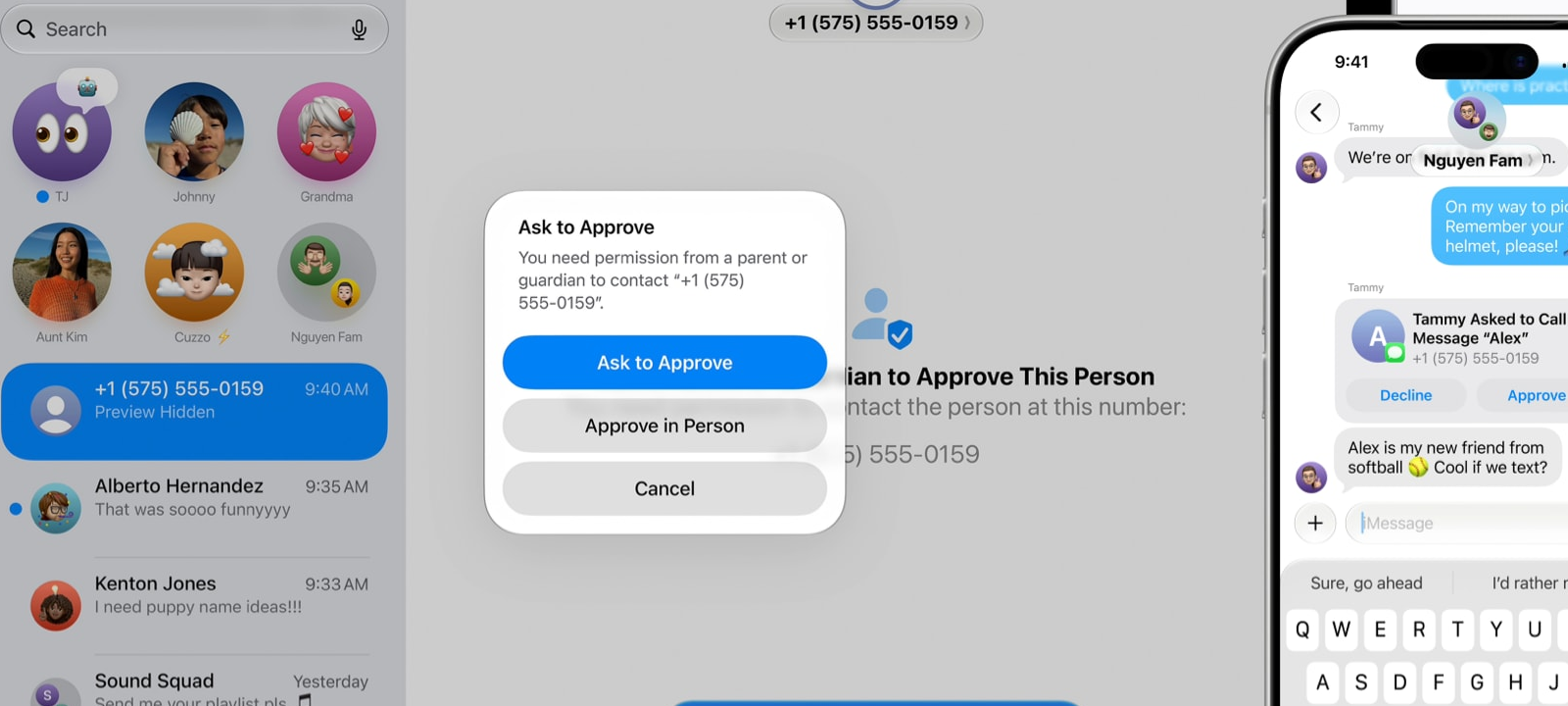
Apple also previewed new child safety features for iOS, iPadOS, and macOS. These include a simpler child account setup, Ask to Browse in Safari, Time Allowances, redesigned Screen Time, and more communication controls. The most useful part for families may be that Apple is trying to make these controls easier to understand and adjust.
This is a good topic for home readers because parental controls often fail for practical reasons, not because parents do not care. If settings are hard to find, hard to explain, or too strict to live with, families stop using them. Simpler controls can help parents set boundaries without turning device use into a constant fight.
Apple Intelligence and AI on the Mac
Apple’s AI news this week is not just about Siri becoming more capable. It is about AI moving deeper into the normal Mac experience. Apple says Apple Intelligence will help with browsing, photo editing, writing, messages, mail, and other everyday tasks. Siri AI is also being positioned as more personal and more capable across Apple devices.
That raises a useful question for ordinary Mac users: when should AI be trusted?
AI can be helpful for summarizing a long document, rewriting a confusing message, organizing information, or explaining something in simple terms. But AI can also make mistakes, miss context, or produce a confident answer that still needs checking. The more personal the task, the more careful people should be.
For example, asking AI to summarize a public article is low risk. Asking AI to summarize tax papers, medical documents, legal letters, private family messages, or sensitive work files deserves more thought. The same goes for AI tools that ask for permission to see files, email, photos, screen contents, or browser tabs.
The safest habit is to start small. Use AI for low-risk tasks first. Read its answers before acting on them. Do not paste passwords, recovery keys, Social Security numbers, banking details, or private account information into any chatbot or AI tool. If an AI feature is built into the operating system, still take a moment to understand what it can access.
OpenAI: Lockdown Mode and Memory
OpenAI had two consumer-relevant updates this week.
First, OpenAI said Lockdown Mode is rolling out to personal ChatGPT accounts and self-serve ChatGPT Business accounts. Lockdown Mode is an optional security setting meant for people who want a more conservative ChatGPT experience when working with sensitive information or connected features. The simple idea is that some tools are powerful because they can connect to websites, files, apps, or external services. Those same connections can also create risk if a malicious page or prompt tries to trick the AI into revealing or misusing information.
For home users, Lockdown Mode is worth knowing about if they use ChatGPT for sensitive tasks. That could include personal finance, legal paperwork, private research, health-related notes, family records, or business documents. It is not a magic shield, but it is a useful reminder that AI tools now need security settings, just like browsers, password managers, and phones.
Second, OpenAI announced an update to ChatGPT memory. The goal is to make memory fresher, more useful, and easier to review. Memory can be helpful because it lets an assistant remember preferences, projects, and constraints across chats. It can also feel sensitive because it involves personal context that builds over time.
The practical advice is straightforward. If using memory, review what is saved from time to time. Delete things that are wrong, outdated, or too personal. If using ChatGPT on a shared computer or for sensitive topics, think carefully about whether memory should be on at all.
Anthropic: AI and Cyber Threats
Anthropic published research this week about AI-enabled cyber threats. The company looked at accounts banned for malicious cyber activity and found that attackers are using AI for more than basic phishing or simple code help. According to Anthropic, malicious actors are increasingly using AI deeper in the attack process, including more complex steps that used to require more technical skill.
This does not mean every home user is suddenly facing a movie-style hacker using autonomous AI. The practical takeaway is more ordinary and more useful: scams may become better written, more targeted, and more convincing. Fake support chats may sound more natural. Fake security warnings may be better formatted. Fake login pages may have fewer obvious mistakes. Messages that used to be easy to spot because of bad grammar may no longer stand out.
Anthropic also announced Claude Fable 5 and Claude Mythos 5. For consumers, the important part is not the model names. It is the safety discussion around more capable AI systems. Anthropic says Fable 5 includes safeguards that can route some higher-risk requests to a less capable model, while Mythos 5 is aimed at a smaller group of trusted cyber defenders and infrastructure providers.
The consumer angle is that AI companies are now openly balancing usefulness against misuse. That is a good thing to watch. As AI tools become more powerful, people should expect more settings, restrictions, labels, and safety choices. Sometimes those protections may feel inconvenient. But without them, the same tools that help write, code, summarize, and research can also help scammers move faster.
xAI, Grok, and Deepfake Privacy
xAI and Grok were in the news this week because of lawsuits and public concern around AI-generated sexualized images and deepfakes. Associated Press reported that British lawmaker Jess Asato filed a legal claim against xAI, alleging that Grok generated fake bikini images of her. The Guardian also reported that more claimants are seeking to sue xAI after Asato’s test case.
This topic is uncomfortable, but it is important for privacy and security readers. Deepfakes are not only a celebrity problem. They can affect students, parents, employees, small business owners, and ordinary people. AI image and video tools can be used for harassment, scams, impersonation, blackmail, and reputation damage.
For home users, the most important advice is not to treat every image or video as proof. If a shocking photo, video, or screenshot appears online, pause before sharing it. Look for confirmation from trusted sources. Be especially careful with posts that are designed to create anger, embarrassment, or urgency.
Families should also talk about this openly. Kids and teens need to know that fake images can be made, that being targeted is not their fault, and that they should ask for help quickly if someone threatens them with an image or video. Adults should know the same thing. Save evidence, report the content, and contact the platform or local authorities when needed.
Bottom Line
This week’s Mac security and privacy news points in two directions at once. Apple is making AI and family safety tools more central to the Mac experience. At the same time, attackers and scammers are using ads, fake apps, and AI-generated content to make old tricks feel new again.
The best defense is practical awareness. Keep devices updated. Download software carefully. Treat AI tools as useful but not all-knowing. Review privacy settings. Be skeptical of shocking images, urgent warnings, and anything that asks for passwords or Terminal commands.
Mac security does not have to be complicated. Most of the time, it comes down to slowing down at the right moment.
 SecureMac is dedicated to cutting through the noise and helping people stay safe, informed, and confident with their Macs. Lover of all things mac-security.